
Wiki
Intro
Hermes, the messenger of the gods, is able to move quickly and freely between the worlds of the mortal and the divine.
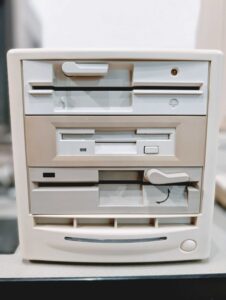
This is a computer museum peripheral that serves the ability to read and write complete floppy disk images for all varieties of vintage computer systems.
#project-computer-museum and #help-vintage-pc are the Slack channels for this tool.
Install
You need a USB-C host (laptop) and to install Python-based software to talk to this USB serial device. The power button is in front on the bottom right and latches in. The lens across the bottom lights up amber once it’s on. Your USB host powers the actual board in there, which should be minimal current. It is USB 2.0 class, so USB C to A and other adapters will work fine.
- Greaseweazle
-
pip install git+https://github.com/keirf/greaseweazle@latest
-
- Fluxengine
-
pip install fluxengine
-
About the Hardware
Greaseweazle is a hardware project and accompanying software program to access floppy disk media at the magnetic flux level. It is a serial device that can capture or record complete container images of a variety of floppy disk. It is a misnomer to think of it as a “USB floppy drive.” This peripheral only serves complete disks–not filesystems, individual files, blocks, or bytes.
This peripheral is a Greaseweazle v4.1 connected with a 3-disk Shugart floppy cable to three different kinds of IBM floppy drives.
Disk Drives
- Top drive: 48 TPI 5.25″ IBM DSDD Floppy (2)
- Center drive: 3.5″ IBM DSHD Floppy (1)
- Bottom drive: 96 TPI 5.25″ IBM DSHD Floppy (0)
The 48 TPI drive is an older standard that writes wider tracks. Disks it creates will be more compatible and easier to read in older systems that do not support QD (quad ~720k) or HD (high ~1.2M) densities.
Disk sizes such as 360kB, 720kB, 1.44MB don’t apply as cleanly here. We’re used to IBM’s 720 and 1.44, but other microcomputers used different schemes and thus had different capacities. That’s why they’re not cross-compatible with each other.
Disk Types
- SS = Single-Sided
- DS = Double-Sided
- SD = Single-Density (Never made on Mini and Micro disks, this is from the 8″ era)
- DD = Double-Density
- QD = Quad-Density (colloquially)
- HD = High-Density
- ED = Extended-Density (Very rare; IBM & NeXT)
- FD = Floppy Disk 8″ form factor
- MD = Mini Floppy Disk 5.25″ form factor
- MF/MFD = Micro Floppy (Disk) 3.5″ form factor
- Other Examples
- MF2DD = micro floppy (3.5″) two-sided, double-density (~720 – 880kB)
- 3.5 DSHD = micro floppy (3.5″) two-sided, high-density (~1.44MB – 1.76MB)
- MD2HD = mini floppy (5.25″) two-sided, high-density (~1.2MB)
Most Common Disk Types
- 3.5″ DSHD (1.44MB IBM, 1.44MB Apple Mac, 1.76MB Amiga)
- 3.5″ DSDD (720kB IBM, 800kB Apple Mac, 880kB Amiga)
- 5.25″ DSDD (360kB IBM)
- 5.25″ Flippy (A SSDD with a second notch cut that gets flipped over)
- 5.25″ SSDD (180kB IBM, 140kB Apple ProDOS 3.3, 191kB KayproII/CPM)
- Commodore 64? We don’t have a C64 floppy drive, so the Pi1541 is used in place.
- There’s many other formats and capacities not listed. fluxengine and gw will indicate if they support them.
- Microsoft DMF? Use a Windows 9x machine like the Dell T500.
Examples
Apple II+
Usually the top “drive 2″ would be used, for 48 TPI 5.25” disks.
Reading an Apple II Floppy Disk to A Modern Host Computer
- Install and use Fluxengine software. Greaseweazle hardware can interface, but its software is not yet Apple II compatible.
- Fluxengine’s CLI readme on Apple II disk imaging: https://github.com/davidgiven/fluxengine/blob/master/doc/disk-apple2.md
- Read this thread (for now) for the hardware connection details.
Read & Save A Disk Image File
fluxengine read -c apple2 --140 -s drive:2 -o disk-image-name.dsk
Writing an Apple II Disk
It was able to copy an existing Apple floppy disk as an image, write that image back out to a blank disk, and have that copy function on the Apple II+ computer. Internet disk images have not fared as well (yet).
fluxengine write -c apple2 --140 -d drive:2 -i ~/Downloads/apple2_dos33.dsk
Amiga 1000
Use the gw software. Make sure the write protect switch on the floppy disk is not enabled. It is fine to use either DD or HD disks in this drive. The Amiga 1000 itself is a DD drive, so only 880kB images will work on the actual computer. Tape can be placed over the hole of HD disks to trick an HD drive into think it’s DD.
gw write --drive 1 my_disk_image.adf

gw read --drive 1 my_disk_save.adf
Macintosh SE, SE/30, Classic, Classic II
gw cannot handle this 3.5″ format yet. Maybe fluxengine does better? AppleSauces are expensive and constantly sold out. We have various ways of networking the museum Macs to write out any arbitrary floppy disks if necessary. Usually we’re dumping stuff on with BlueSCSI.
Questions and Thoughts
Aren’t there way more drives you’re missing? Not really. You might be thinking of stuff like: Zip100, Zip250, Zip750, 3.5″ DSED, LS120, LS240, FD32, and DMF. Right?! And the 3-mode Japan used on their 360rpm 3.5″ disks? These technologies actually did not have multiple track layouts on themselves. Zip disk was proprietary, so there only ever was one format other than the larger sizes that came out. LS 120 and 240 go on the IDE or SCSI bus, so they’re always going to be a block device, no exotic formats. FD32 is a specialty of LS240 devices. DMF can be read in a standard IBM disk drive through Windows (but not by a USB floppy drive you can buy today). As far as I know, the IBMs and NeXTs both used the same 2.88MB format. Most of these also did not have retail releases of software, but would just be user files. USB floppy disk drives will not do DSDD or DMF, they only do IBM 1.44MB. There were more formats than this, but those only exist in magazines and perhaps some retired engineer’s basement storage. I have seen ~3.5 MB 5.25″ disk drives show up on eBay for who knows what CNC or train or airline thing? If you can find this stuff, we can make it a project to try and use it!
Future
Something more automated to select images or dump a disk. Getting it this far is already a big lift as far as getting media and software running on old machines.
Ancient Wisdom
EXEs that want to write their own floppy disk media
Context: What are these?
Why? Computers were barebones and expensive
Why is the install forced to the floppy disk?
Why do we care today about these programs writing to a floppy disk?
Where is Hermes positioned in this?
It’s not. It cannot be used for this. The software-hardware environment has to be recreated to run the program and get the resulting disk. But then Hermes can make dumps of that resulting disk!
- Level 1: At denhac’s museum, we have the option to brute force these by gathering up the required hardware. It’s possible here in Denver, but not reproducible until physical actions take place. The resulting disks may then be binary dumped by Hermes.
- Level 2: Standing up a virtual machine environment that can run the program and produce a binary blob that’s a compatible Gotek image. Documenting this workflow.
- Level 3: Completely reverse engineering the binary to churn out a compatible Gotek image or something that Greaseweazel or Fluxengine may ingest to output a physical disk. This would make a good computer science student semester project.
Why is this talked about here?
It’s on this article page because it’s a related problem to encounter with vintage computers and floppy disks. Hermes can at least dump the results as a disk image and that could be shared online. Most people would be willing to buy a Gotek or Greaseweazel, but not a shelving unit full of computers.
This section came to be written from the process of getting a CMOS disk created for a Compaq Portable III that has only an upgraded 3.5″ floppy drive. Once its CMOS battery dies, it cannot boot from its own hard drive or a 3.5″ drive. The hard-coded default it falls back to is a 360K DSDD 5.25″. And Compaq’s specific program to create these setup disks also detects 96TPI drives and tells you not to use it. So then you need a DOS machine with a 48TPI drive to properly do this. The CMOS setup program was not built into ROM on those systems like we’re used to (the “press del” to enter the setup BIOS thing). It turns out many other computers did this.
Other Resources
A Related Bukowski Poem
16-bit Intel 8088 chip
with an Apple Macintosh
you can’t run Radio Shack programs
in its disc drive.
nor can a Commodore 64
drive read a file
you have created on an
IBM Personal Computer.
both Kaypro and Osborne computers use
the CP/M operating system
but can’t read each other’s
handwriting
for they format (write
on) discs in different
ways.
the Tandy 2000 runs MS-DOS but
can’t use most programs produced for
the IBM Personal Computer
unless certain
bits and bytes are
altered
but the wind still blows over
Savannah
and in the Spring
the turkey buzzard struts and
flounces before his
hens.— Charles Bukowski
floppy