
Wiki
OM Tech Quantum 60W RF Laser – Training Notes
Training Required – Laser Cutter Authorization class. See full training and machine notes on the laser cutter main wiki page.
If you were certified on the older lasers – you can use the quantum but you need to read this entire document closely before using this machine.
Material Holds
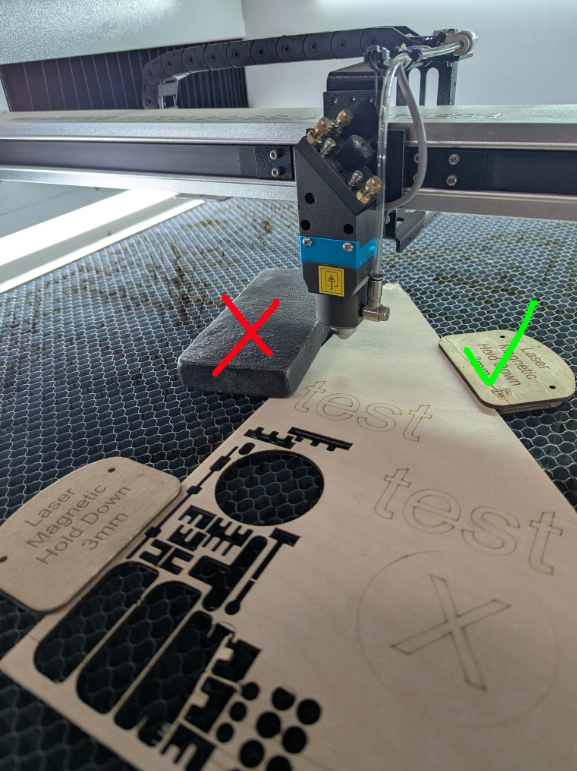
The quantum laser runs up to 4,000mm/s (compared to 400 mm/s) and acceleration settings “overscans” the job. This means the laser head goes way outside of the lightburn “frame” area. Our training on the other laser to frame before placing weights is not safe. Therefore – Everything in the bed must have clearance under the laser head. DO NOT USE HOLD WEIGHTS or anything the laser could crash into anywhere in the bed. Only magnet weights or thin hold downs that the head completely goes over are allowed.
Setting up your Job
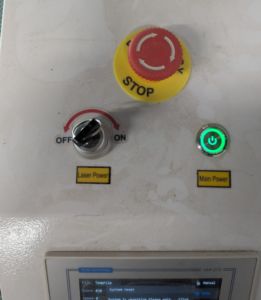
- Turn on/off the machine with the “Main Power” button.
- “Laser power key” enables power to the laser tube. It’s ok to keep this on. Leave the key in the machine always.
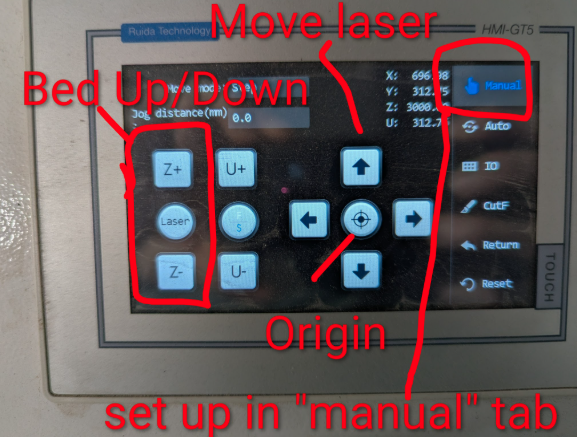
- The controls are now touch screen. Go to the “Manual” tab to move the laser & set origin.
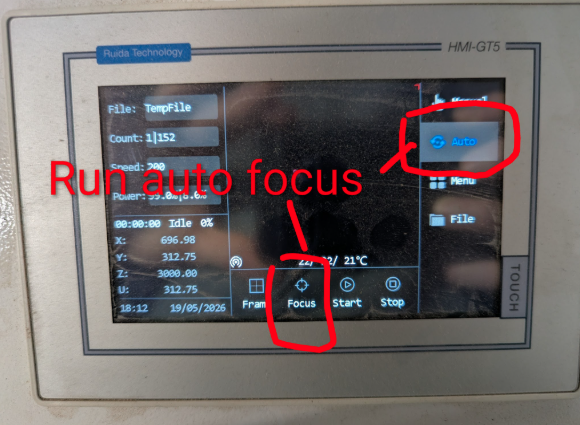
- Go to the auto tab and use “focus” when the laser head is over your material.
- Click confirm on the warning – This will raise the bed until it touches the nozzle sensor and correctly set the focus distance (9.7mm from tip of nozzle).
- Frame / Run jobs from lightburn as usual.
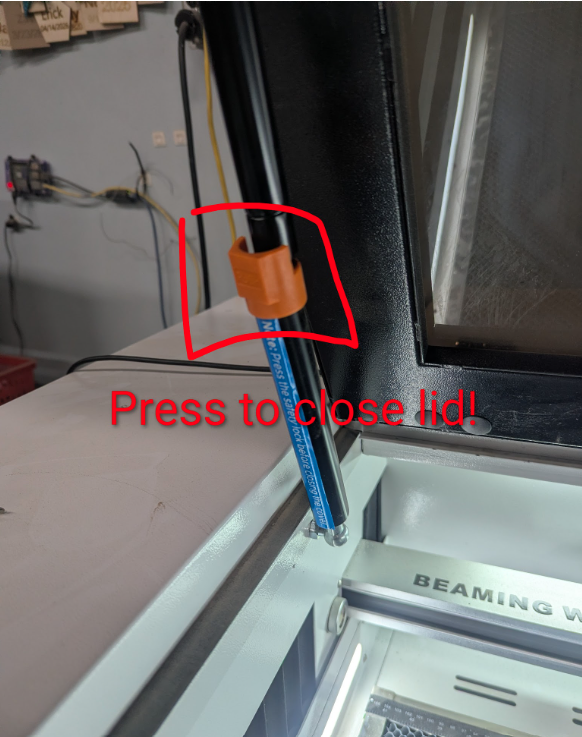
You need to press the orange button on the left hinge to close! Don’t force the lid down.
Other Differences / Noteworthy
- Air Assist automatically starts only when the job is running. We have these preset to the recommended settings. You don’t need to mess with the air settings on the machine or in lightburn.
- Line Mode – will run high air at 0.25 PSI
- Fill Mode – will run low air pressure at 0.1 PSI
- There is no water chiller.
- Min Power 8%
- Max power 99%
- The built in exhaust fan automatically turns on/off. We have the one on the wall constantly on and set to low to help with fume extraction. If you notice excessive fumes building up please stop using the laser and post in slack.
- It’s not always practical to use faster settings on fills because of acceleration and the overscanning. Sometimes 4000 speed will take a lot longer than running it at 800. Experiment a bit.
Still being worked on
- Camera for aligning jobs
- Rotary device – Learn more here
- Some lines / fills are coming out a bit off. We’re working in both software and hardware to fine tune and improve these. If you notice your jobs being off please post pictures and your settings in slack to help us. Do not make hardware or software (lightburn machine settings) without first communicating with maintainers.
- There’s a really annoying motion activated cosmetic light by your feet – ignore it.