
Wiki
Stats
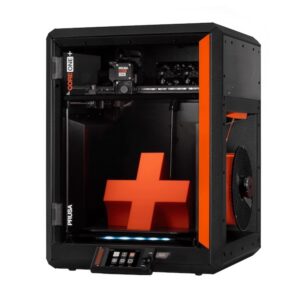
| Name | Prusa Core One+ |
|---|---|
| Location | 3D Printing Room |
| Status | Incoming |
| Training | Required (basic FDM training) |
| Access | purpleprusa.inside.denhac.org |
| Owner | Denhac |
Overview
What is it?
The Prusa Core One+ is a 2025 CoreXY 3D printer with a 250x220x270mm build volume, procured by Denhac in July 2026. It has a similar build volume to the MK4S, with an extra 10mm on the Y axis and an additional 50mm on the Z. This means you can print the same sized models as on the MK4S, but with a bunch of extra Z-height – and the extra 10mm of Y axis build area can help you squeeze in parts that were a tight fit or just barely didn’t fit on the MK4S.
Frame & Mechanics
The Core One+ is built around a sturdy steel “exoskeleton” design with a completely different mechanism from the MK4S – CoreXY. CoreXY systems feature a belt-driven gantry fixed to the top of the printer, composed of the X and Y axes, while the Z axis is built from three lead screws and three guide rods that raise and lower the heatbed. This comes with several benefits over the Cartesian mechanism found on the MK4S and other traditional bedslingers, the most notable of which are speed, print quality, and stability.
Prusa estimates 15-20% faster print speeds on the Core One+ due to its lack of a heavy bed to move back and forth on the Y axis. Because the gantry isn’t fighting gravity (and because the print bed only moves up and down), less torque is exerted on your print, meaning you can much more easily get away with printing tall and thin parts. This makes the Core One+ a great choice for tall prints.
Chamber, Filtration, & Materials
The Core One+ has a fully enclosed chamber designed to keep heat inside, as well as an active thermal management system. A pair of fans in the back exhaust hot air to keep the chamber cool while you’re printing with PLA or PETG, and the intake vents on top will automatically open or close depending on the material you’re using. If you’re printing with more engineering-grade materials, those vents are closed and the Core One+ will use the heatbed to radiate heat throughout the chamber.
Coupled with the Advanced Filtration system mounted on the back, which pulls the chamber air through HEPA and carbon filters, the Core One+ is an ideal choice for advanced materials like PC, Nylon, ABS, and ASA, and does well at managing VOC output from these materials. Of course, your personal tolerance to fumes from such materials may vary, and we cannot guarantee 100% clean air from this printer.
When should I use it?
You can use the Core One+ for anything you would usually print on the MK4S, but it would be preferred for you to use it mainly for materials like ABS, ASA, PC, etc., or if you need the extra build height, print stability, or speed. Ultimately usage is up to your discretion, as it is with the MK4S. Do note that using the Core One+ counts towards our “one printer at a time” rule.
Material Compatibility
| Material | Recommended Build Plate | Compatible? |
|---|---|---|
| PLA, PLA Silk, composite PLA’s, etc. | Prusa Satin, Prusa Smooth, Prusa Textured, Cryogrip Glacier | Yes |
| PETG, PETG-HF, PETG-GF, PETG-CF | Prusa Satin, Prusa Textured, Cryogrip Glacier | Yes |
| ABS/ASA and variants | Prusa Satin, Cryogrip Glacier | Yes (see notes) |
| TPU (90A and above) | Prusa Textured ONLY | Yes (see notes) |
| TPU (softer than 90A) | None | No |
| Polycarbonate (PC) | Prusa Satin | Yes (see notes) |
| Nylon (PA) | Prusa PA Powder-Coated | Not right now, but later (see notes) |
| Insert weird engineering filament here | Please ask a SIG lead or maintainer for guidance first! | Maybe |
Some general tips for printing more advanced materials:
- ABS and ASA: Your prints will benefit from the Core One’s thermal management. You don’t need to do anything particularly special here, just make sure you use the right plate as specified above. The printer will take a bit longer than usual to heat up for these materials, since it needs to get the chamber up to temp.
- TPU: You’ll want to toggle the filament sensor (accessible on the right side from inside the frame) to the orange “X,” which is OFF. This opens up the feed path to make it easier to load the filament in. Your mileage may vary when it comes to TPU performance on this printer. Ensure your TPU is dry before you print with it.
- Polycarbonate: You should feed this into the printer directly from a dry box with silica gel, bypassing the spool holder. Drying before printing is MANDATORY on non-CF PC as PC is super thirsty.
- Nylon: We plan to allow for this in the future, but nylon requires a very dry environment and high-temperature drying that we do not have capacity for at the moment. Additionally, it prints best on Prusa’s PA sheets, which we do not currently have.
We got the Core One+ to encourage people to use more advanced materials, so if you want to try something weird you found, please ask someone first!
What not to do
For the safety of the equipment, please:
- Do not attempt to manually move the toolhead unless absolutely necessary, especially if the printer is on.
- Do not remove the top cover or side windows.
- Do not, under any circumstances, attempt to manually rotate the lead screws, or move the bed. Use the controls on the screen.
- Do not try to force filament through the sensor if it refuses to feed. Cut the end to a sharper angle and try to feed again.
- Do not change out the nozzles, open the gearbox cover, or otherwise tinker with the printer.
Basic Operation
Loading
Loading the Core One+ is basically the same as loading the MK4S, with the addition of a PTFE tube.
- Ensure nothing is currently loaded. If it is, unload it or select Change Filament.
- Cut the end of your chosen filament to a 45º or sharper angle.
- Load your spool onto the spool holder on the right side.
- Begin feeding your material through the PTFE tube sticking out of the right-side handle on the printer. You will encounter a couple “halts,” first at the side filament sensor/inlet and again once the end reaches the curve in the tubing just above the toolhead. Continue pushing until you can’t anymore, and then hit Continue on the screen.
- The printer will prompt you for which material you want to load. Choose it from the menu.
- The printer will purge the prior material and ask if you want to continue purging. Continue doing so until you are satisfied and/or hit Continue when done.
- The printer will auto-retract the filament; wait to grab the purge until after it completes that process. Once it’s done, grab the purge string and throw it away.
You can also initiate the process by feeding your filament through the handle, upon which the printer will home itself and prompt you to feed the filament into the extruder.
Unloading
Exactly the same as the process on the MK4S:
- Choose “unload.”
- Wait for the printer to prompt you to unload the filament.
- Grab your spool and pull the filament out of the PTFE tubing. Secure the end.
Slicing Tips & Uploading
Make sure that you’ve selected “Prusa CORE One HF 0.4 Nozzle” as your printer profile in the slicer; otherwise, slicing is the same as for the MK4S. Make sure you haven’t selected INDX or any of the other Prusa models. Slicing is the same general experience as on the MK4S, just with more build volume.
The Core One+ uses Octoprint as with all our other printers. Please refer to the MK4S page for Octoprint instructions.
Preflight checklist
Before hitting print in Octoprint, always ask yourself the following:
- Has the build plate been wiped down with IPA?
- Does the material in the printer reflect the material you selected in the slicer?
- Did you enable supports for overhangs?
- Did you select the correct printer profile and corresponding nozzle diameter and type in PrusaSlicer?